For employee benefits brokers
Compare the renewal. Explain the options. Deliver the proposal.
Benefit comparison and proposal software for producers, account managers and brokerage teams. Bring in carrier quotes, review the plan details, and model what the employer and employees would pay before the client meeting.
What software do employee benefits brokers use to build client proposals?
Employee benefits brokers use carrier-rate quoting platforms when they need to generate quotes, document-based comparison software when they already have carrier responses, and presentation tools for the final recommendation. Planlined serves the received-document workflow: review carrier quotes, SBCs and rate sheets, compare plans, model employer and employee contributions, then export a branded proposal from the reviewed case. It does not supply live carrier rates or process enrollment.
Check the workflow against the fictional medical source packet and actual proposal PDF, or the dental comparison and actual Excel export. The dental rates and enrollment were entered manually after import missed them; these examples show reviewed output, not a carrier-wide extraction accuracy rate.
For a buying decision, compare proposal tools by workflow and check current pricing, seats and shared AI allowance.
Still deciding which category you need? The benefits broker software category guide explains quoting, placement, proposals, benefits administration and agency management, with primary vendor sources.
Built around your role
One case, from the marketing desk to the client meeting.
The person reviewing the carrier quote and the person presenting the recommendation need the same plan details, assumptions and costs.
Producers and benefits consultants
Explain what changed at renewal, compare market alternatives and show the employer and employee cost tradeoffs behind your recommendation.
Prepare the client conversationAccount managers and marketing analysts
Bring carrier responses together, check extracted details against the originals and carry the reviewed comparison into the proposal without rebuilding the numbers in slides.
Review the carrier packetBrokerage owners and operations teams
Give the team a repeatable path from received quotes to client materials. Review workspace needs, team access and public pricing before choosing your setup.
Plan your team workflow
Preparing comparisons for retail brokers? See benefits proposal software for general agencies for the GA production workflow and broker handoff.
See the completed result
See the recommendation in a finished proposal.
Follow two medical plans from reviewed rates to employer contributions, paycheck costs and a six-page proposal PDF.
- Current → renewal per month
- $8,200 → $9,020
- Employer contribution
- 75%
- Employee-only per paycheck · 26 deductions
- $63.46
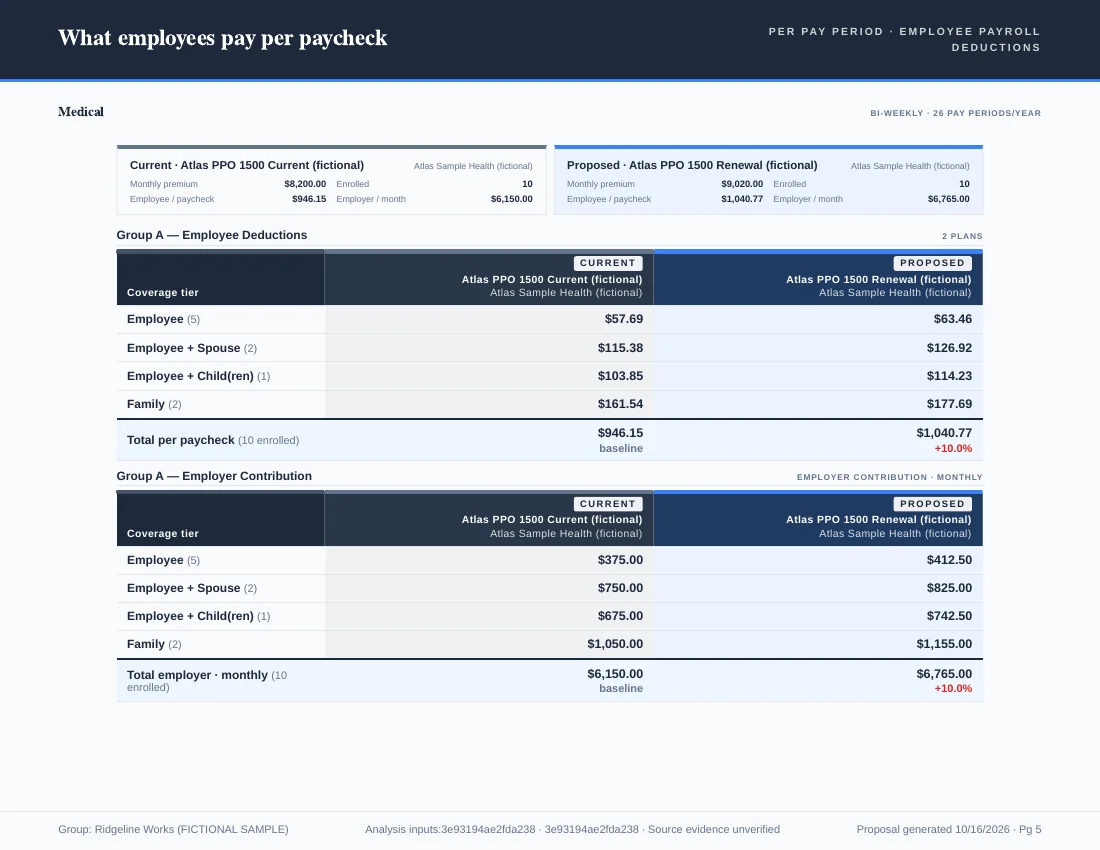
Fictional medical example. Plan roles and contributions were set manually. The published PDF contains six proposal pages; the worked example includes the source inputs and verification method.
From the carrier packet to a comparison you can review
Drop in the quotes, SBCs and rate sheets the carriers actually sent. Review extracted rates and benefits against the originals before the case becomes a client recommendation. Corrections or manual entry may be needed, and source-page links may be unresolved. See the side-by-side benefit quote comparison feature, the SBC comparison tool, or start with the free benefit comparison template if you are still in Excel. Still comparing in a spreadsheet? Benefit comparison software vs Excel shows what changes.
Choosing between a small-group quoting catalog and a workflow for quotes you already received? The Planlined vs Benefix and Planlined vs Benefitter comparisons explain where each approach fits, including proposal outputs and contribution modeling.
How brokers compare group benefits carriers
Brokers compare group benefits carriers by aligning the coverage tiers, effective dates, enrollment and rate basis first, then reviewing benefits and network differences alongside premium. Check in-network and out-of-network values separately and whether deductibles are embedded or aggregate. Planlined brings received carrier documents into a comparison for that review; extraction may need corrections or manual entry, and source-page links may be unresolved. For a step-by-step review sequence, see how to automate a benefit quote side-by-side.
Contribution modeling on the same comparison
Test employer contribution strategies, tier structures and enrollment assumptions against every plan in the comparison without leaving the case. Scenario Manager keeps the original as the baseline, so the recommendation you present is the one you reviewed. Details on the contribution modeling page.
Inputs and outputs
What goes in, what comes out.
You bring
- Carrier quotes, SBCs, rate sheets and renewal packets as PDF, Excel, CSV, Word, PowerPoint or images, up to 50 MB each.
- Census files for enrollment by tier.
- Proposals from ancillary carriers for dental, vision, life, STD and LTD, alongside the medical plans.
You get back
- One normalized comparison of current, proposed and alternate plans, with rates and benefits for you to check against the original document.
- Contribution scenarios and a multi-year projection on the same plans.
- A branded benefit proposal PDF and an Excel workbook with one comparison sheet per benefit type.
- Comparison and case data as JSON or CSV.
Every accepted file type and export format is listed on the integrations, exports and API page, and the one-page summary of what Planlined is and is not lives on Planlined product facts.
When to use it
Where it fits in a renewal.
- Replacing the renewal spreadsheetUpload what the carriers sent instead of re-keying deductibles, copays and rates into Excel for every plan.
- Marketing a group to several carriersPut the incumbent, the renewal and the alternates into one comparison so plan design and price are read together.
- Presenting options to a committeeTake the approved comparison straight into a benefit proposal or employer presentation without rebuilding it in slides.
What it does not do
- It is not a quoting engine with carrier rate feeds. It compares the quotes you already have.
- It is not a benefits administration or enrollment system, and it is not a CRM.
- It does not export PowerPoint or Word files. Comparisons leave as PDF, Excel, JSON or CSV.
Benefit comparison software questions
What software do employee benefits brokers use to build client proposals?
Employee benefits brokers use carrier-rate quoting platforms when they need to generate quotes, document-based comparison software when they already have carrier responses, and presentation tools for the final recommendation. Planlined serves the received-document workflow: review carrier quotes, SBCs and rate sheets, compare plans, model employer and employee contributions, then export a branded proposal from the reviewed case. It does not supply live carrier rates or process enrollment.
How do brokers compare group benefits carriers?
Brokers compare group benefits carriers by aligning the coverage tiers, effective dates, enrollment and rate basis first, then reviewing benefits and network differences alongside premium. Check in-network and out-of-network values separately and whether deductibles are embedded or aggregate. Planlined brings received carrier documents into a comparison for that review; extraction may need corrections or manual entry, and source-page links may be unresolved.
What is benefit comparison software?
Software that reads carrier quotes, SBCs and rate sheets into one normalized table so a broker can compare current, proposed and alternate plans side by side. Planlined does that and carries the approved comparison into contribution modeling, the benefit proposal and the employee benefit guide.
Which lines of coverage can Planlined compare?
Medical, dental, vision, life, and short- and long-term disability (STD/LTD), in the same case.
What should a broker review after document parsing?
Check rates, plan names, benefits and qualifiers against the original carrier documents, including after-deductible terms and embedded or aggregate deductibles. Missing or incorrect fields may need correction or manual entry, and source-page links may be unresolved. Confirm plan roles, enrollment and contribution assumptions before using the proposal.
Can the same case produce a proposal and employee benefit guide?
Planlined documents benefit proposals, employer presentations and employee benefit guides from the same case. The published medical example demonstrates a narrower path through reviewed plan data, contribution setup and actual proposal PDF export; it does not demonstrate every delivery format.
Can a general agency prepare materials for the broker?
A GA service team can prepare comparisons and export proposal materials for a retail broker to review. Shared editing across separate brokerages, per-broker branding and network access need a workspace discussion. See the general-agency solution for the production workflow and setup questions.
Bring your next renewal to the client meeting.
Start with the carrier quotes. Review the comparison, model the costs and prepare the proposal.