Feature
Benefit proposals for the employer meeting.
Build a branded benefit proposal from the reviewed case. Choose the financials, plan benefits, contribution scenarios and recommendation for your employer presentation, then export to PDF or Excel.
See the completed result
See the costs in a finished medical proposal.
Follow two medical plans from reviewed rates to employer contributions, paycheck costs and a six-page proposal PDF.
- Current → renewal per month
- $8,200 → $9,020
- Employer contribution
- 75%
- Employee-only per paycheck · 26 deductions
- $63.46
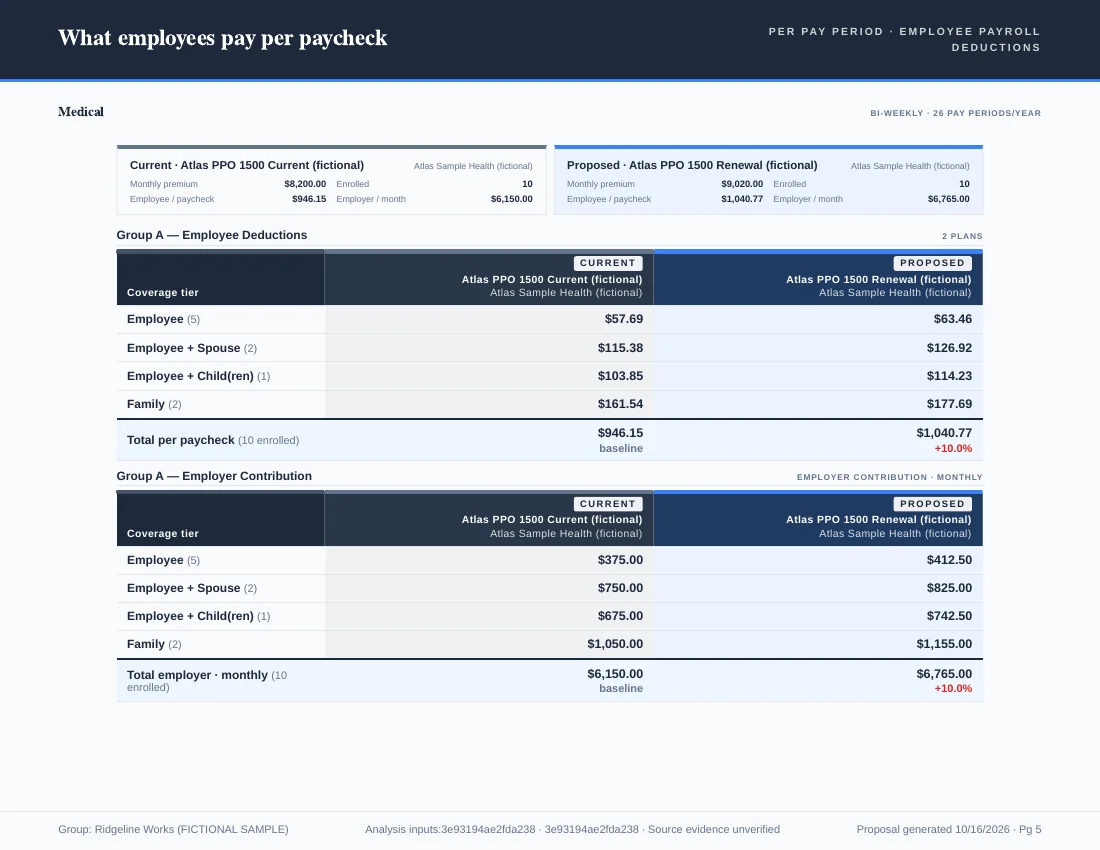
Fictional medical example. Plan roles and contributions were set manually. The published PDF contains six proposal pages; the worked example includes the source inputs and verification method.
- Composition
- Auto-composed
- Chapters
- 5 chapters
- Preview
- Live preview
From your case data
Toggle any page off
Updates as you edit
Walkthrough · 1:30
Build a client-ready proposal, start to finish.
From a reviewed case to the exported PDF, recorded in the app. The employer, plans, carriers and rates are fictional.
Starting from Claude, ChatGPT or Microsoft Copilot? The AI assistant setup and ChatGPT walkthrough shows the separate path from an AI conversation to a case and its proposal book. Review the case before exporting client materials.
The example compares total annual premium only. Contribution inputs were not set up, so it draws no conclusion about employer net cost or employee payroll cost.
Chapters
- Check the caseConfirm the current and proposed plans, enrollment, effective dates and annual premiums. Then open Export, Export Proposal Book.
- Choose your pagesKeep the opening summary, the financials and the benefit pages the decision needs. Check the financial story in the live preview.
- Explain the recommendationName the option, say why it fits, and state the employee tradeoffs. Check it against the case figures before you apply it.
- Style and refineChoose a theme, review the cover, and remove optional pages that have no client content.
- Review and exportRead the delivery checks. This example compares total premiums, so employer net cost would need reviewed contribution inputs. Then export the PDF.
- Check the delivered PDFConfirm the client name, dates, recommendation, financials, benefit details and caveats on every page.
Before the client meeting
- Confirm the client name, coverage period, included plans and enrollment.
- Keep the recommendation specific: name the option and explain the reason.
- Explain benefit changes along with premium differences.
- Check provider networks and prescription coverage against the carrier’s own sources.
- Choose pages that support the client’s decision; leave out unused or unpopulated sections.
- Review the delivery warnings that apply to your analysis.
- Open the exported PDF and check every page for content, fit and readability.
The PDF from this video
The six-page proposal book exported in the walkthrough: cover, overview and recommendation, program financials, medical benefits, medical detail, and census and caveats.
At the same enrollment of 20, the proposed plan’s annual premium is $216,648 against $227,664 today, $11,016 (about 4.8%) less. The individual deductible rises from $1,500 to $2,000 and the primary care copay from $25 to $30, and the book says so.
Read the transcript
A good proposal makes the next decision easier. Start with a reviewed case. Confirm your current and proposed plans, enrollment, and annual premium totals.
Open Export, then Proposal Book. Choose the pages your client needs. Keep the opening summary, financials, and benefit comparison. Use the live preview to check the financial story before you move on.
Next, make the recommendation clear. Explain which option you recommend, why it fits, and what the client needs to consider. Include the tradeoffs. Here, lower annual premium comes with a higher deductible and primary care copay. Review the case figures, then apply the recommendation to the proposal.
Choose a theme, and check that the cover and pages are easy to read. Remove optional pages you have not populated.
Read the delivery checks. Here, we compare total premiums. Employer net cost requires reviewed contribution inputs. Then export the PDF.
Open the finished book. Check the client name and dates, the recommendation, the financials, and the benefit details. At the same enrollment, the proposed option has eleven thousand sixteen dollars less annual premium. Review that alongside the benefit changes.
Planlined. Ready for the conversation.
Inside the book
Every page is built from your case data.
Financials reconcile to the premiums you entered. Comparisons pull from the plans in your sheets. Change a contribution and the paycheck page changes with it.
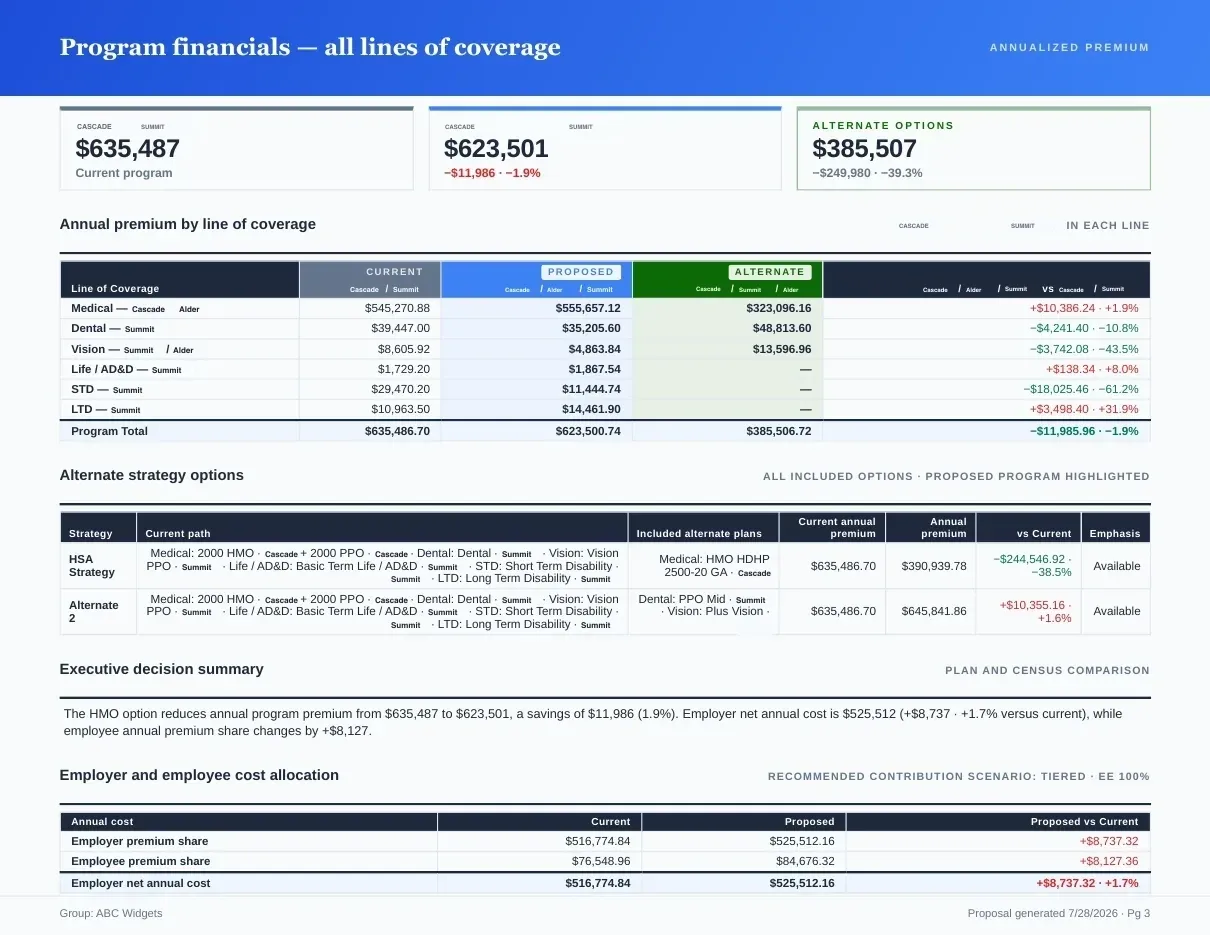
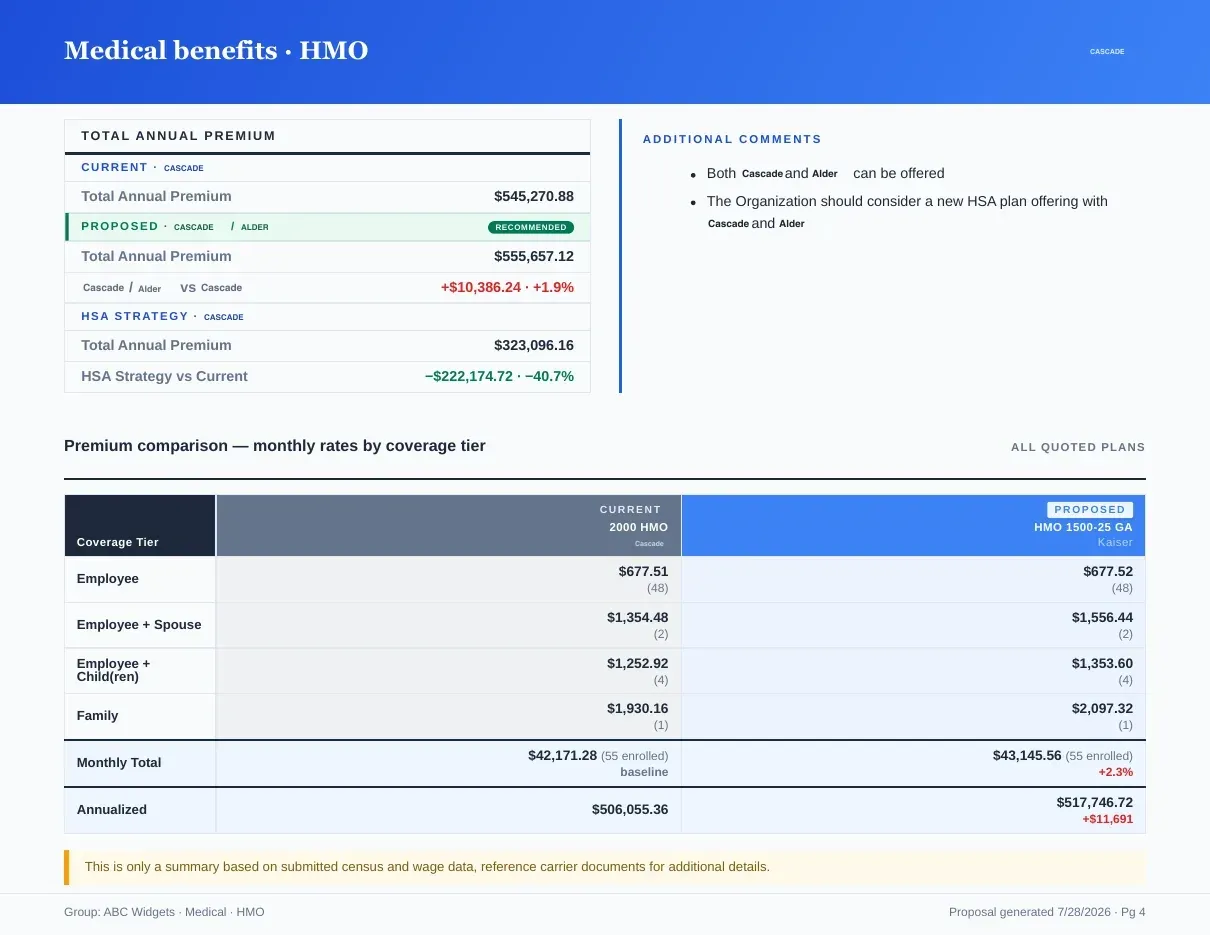
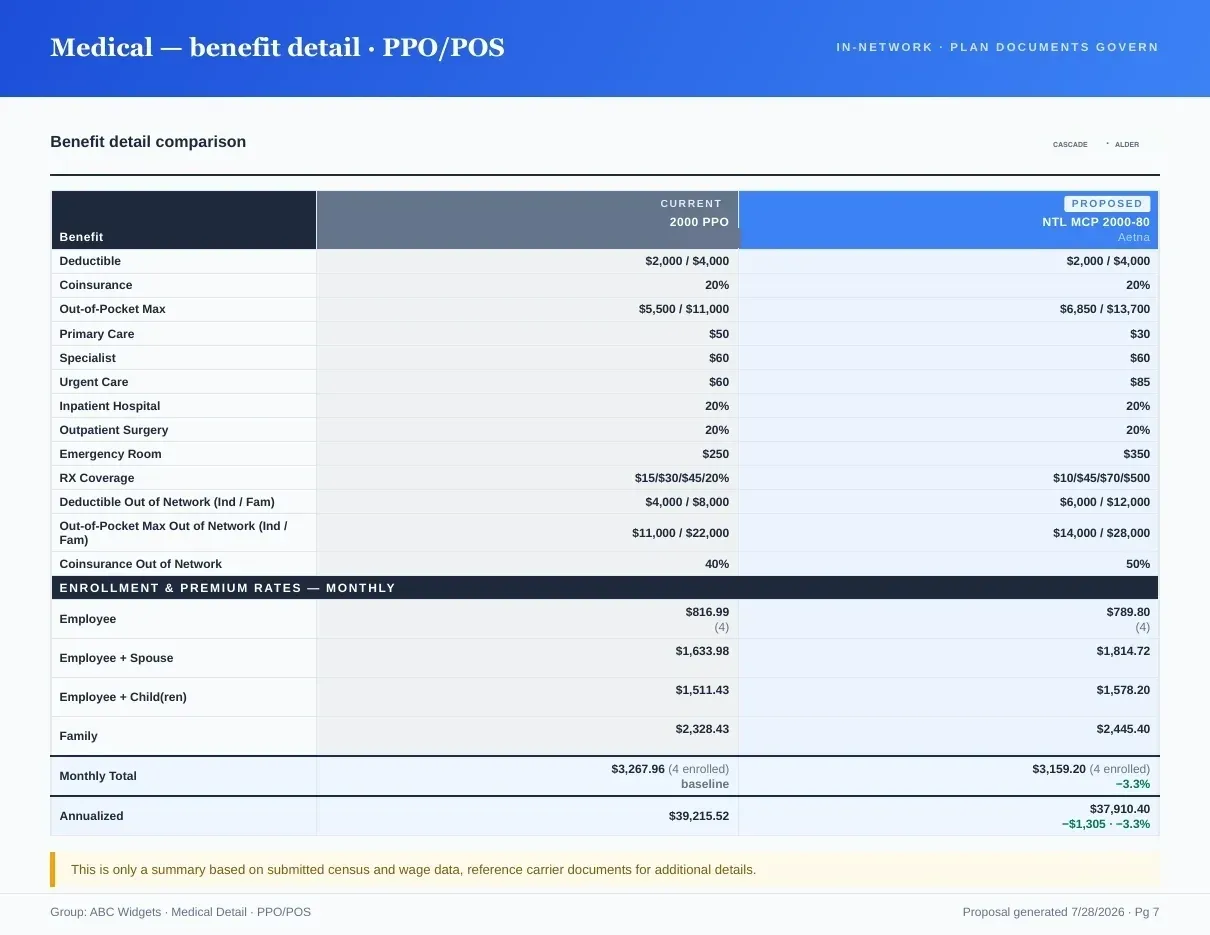
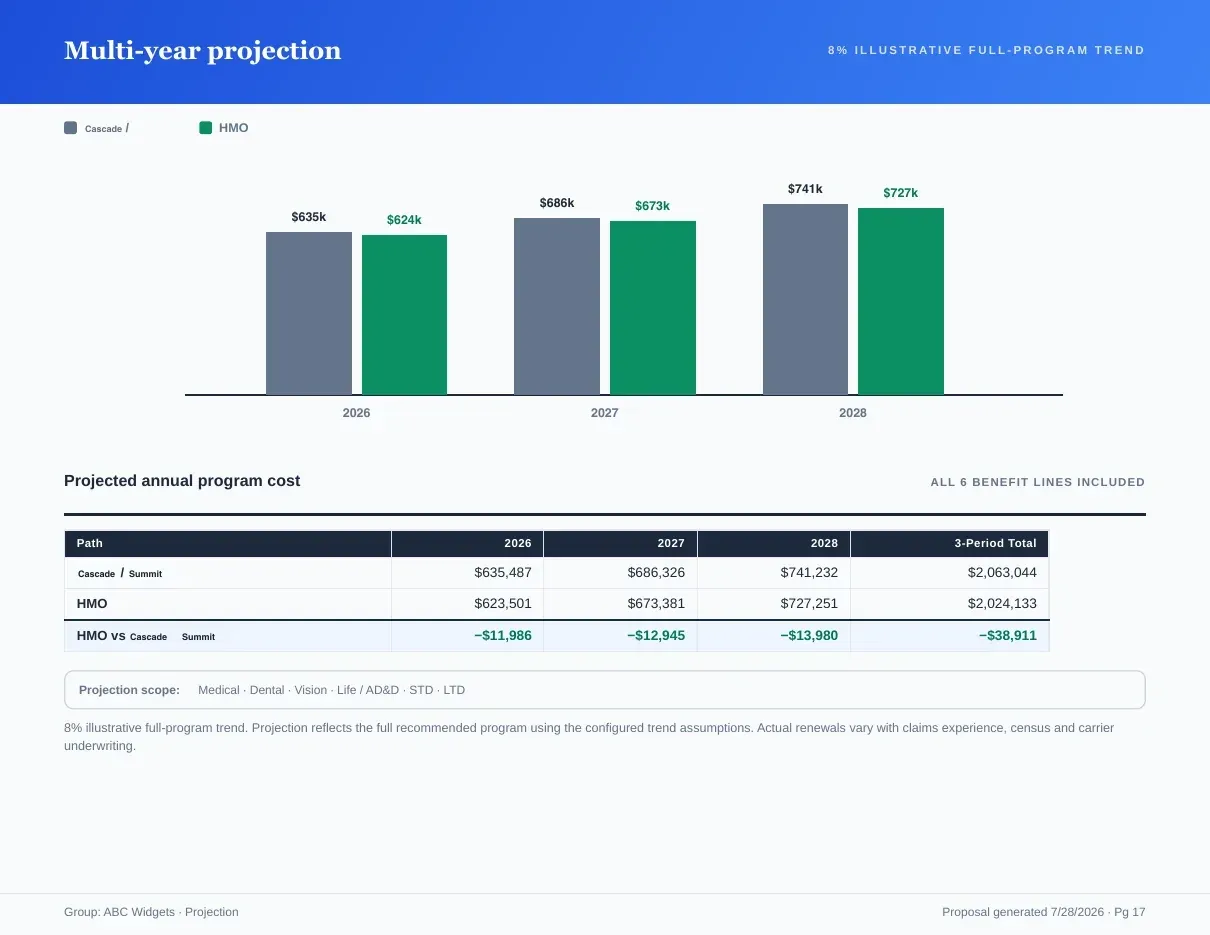
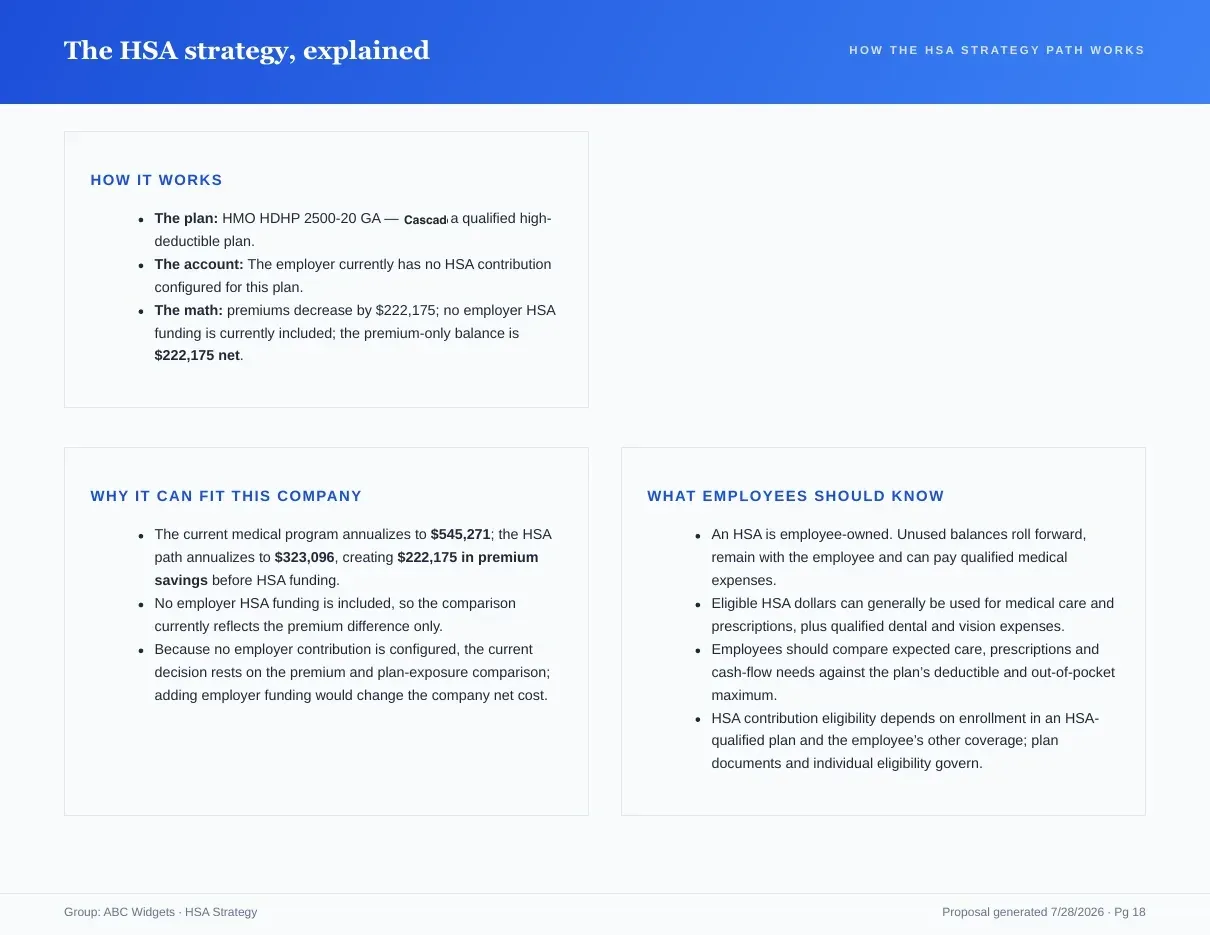
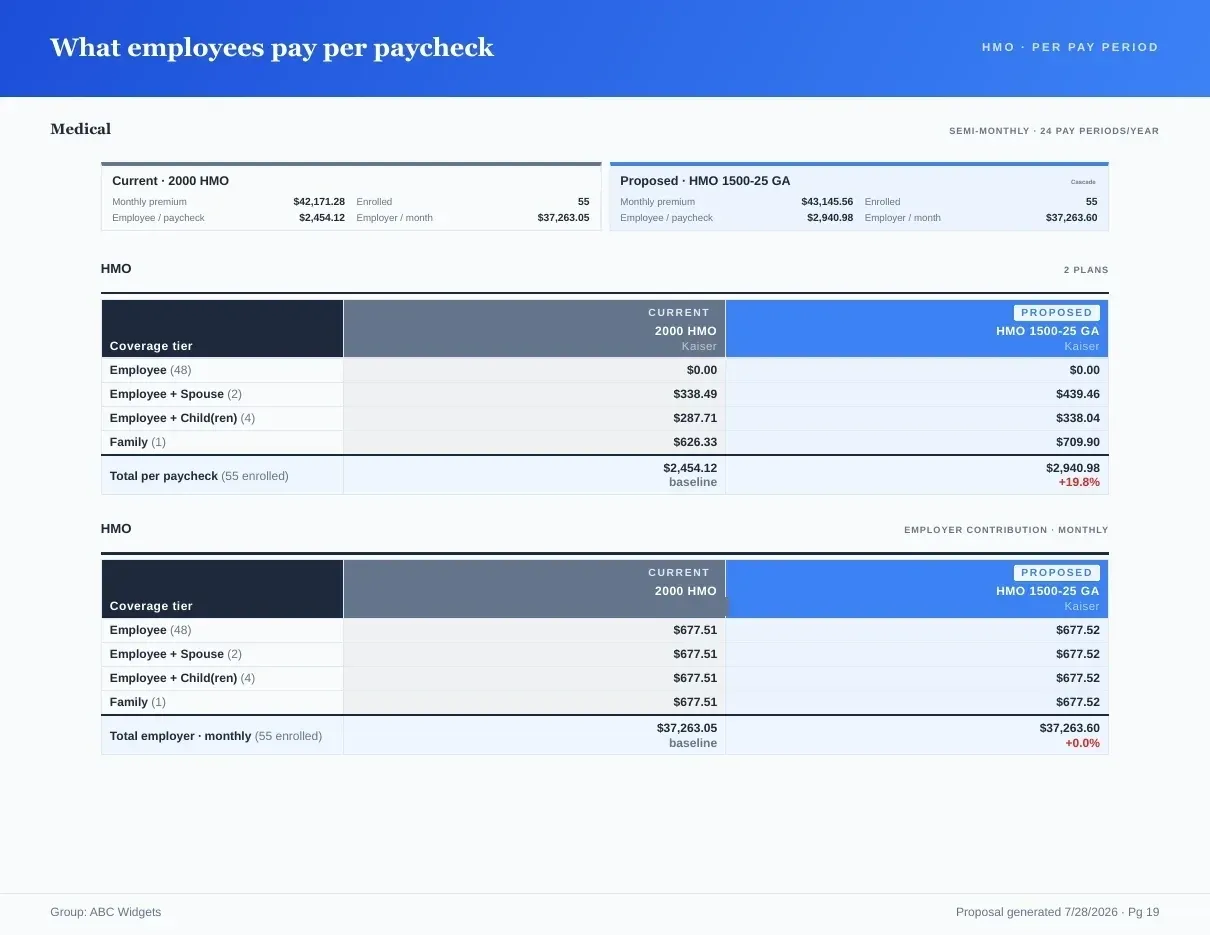
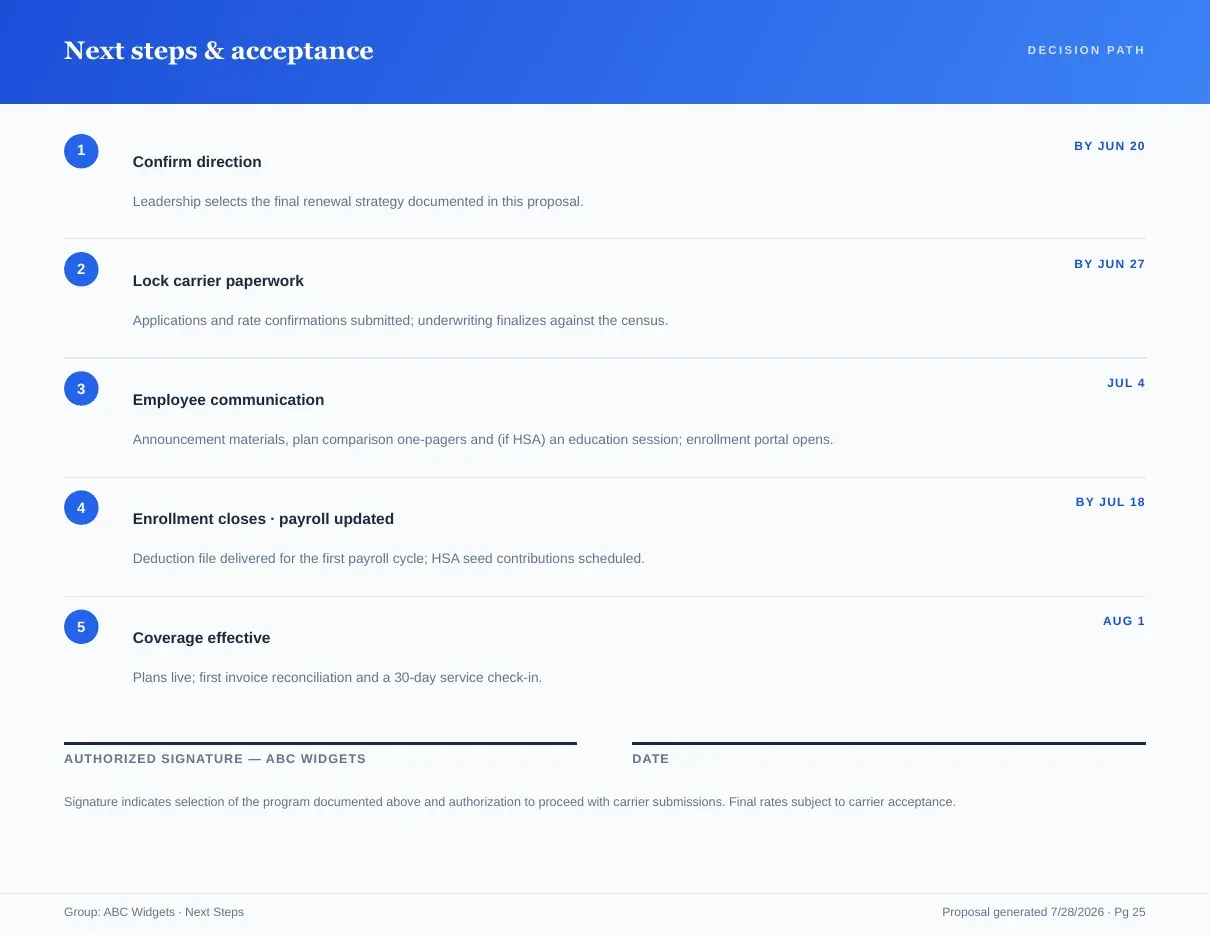
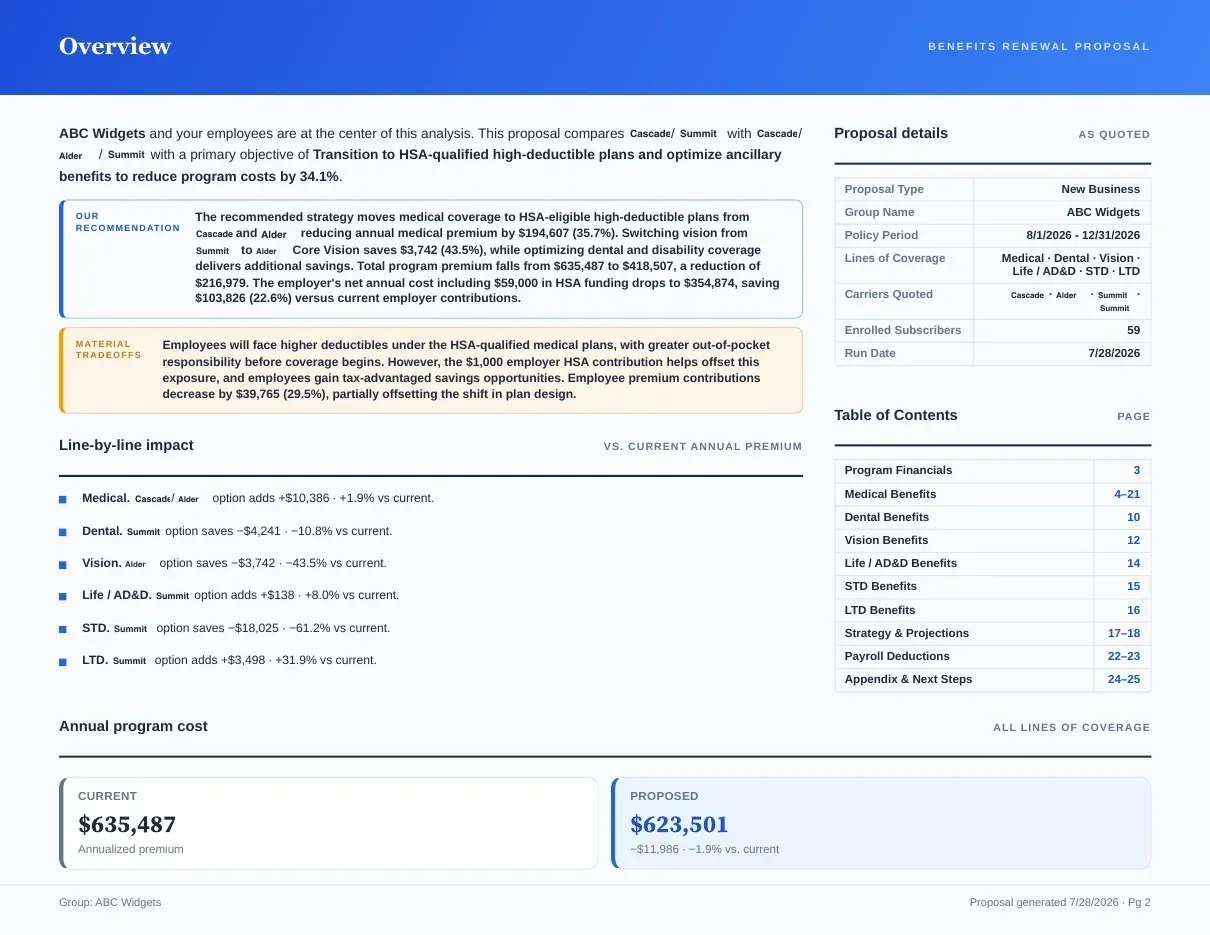
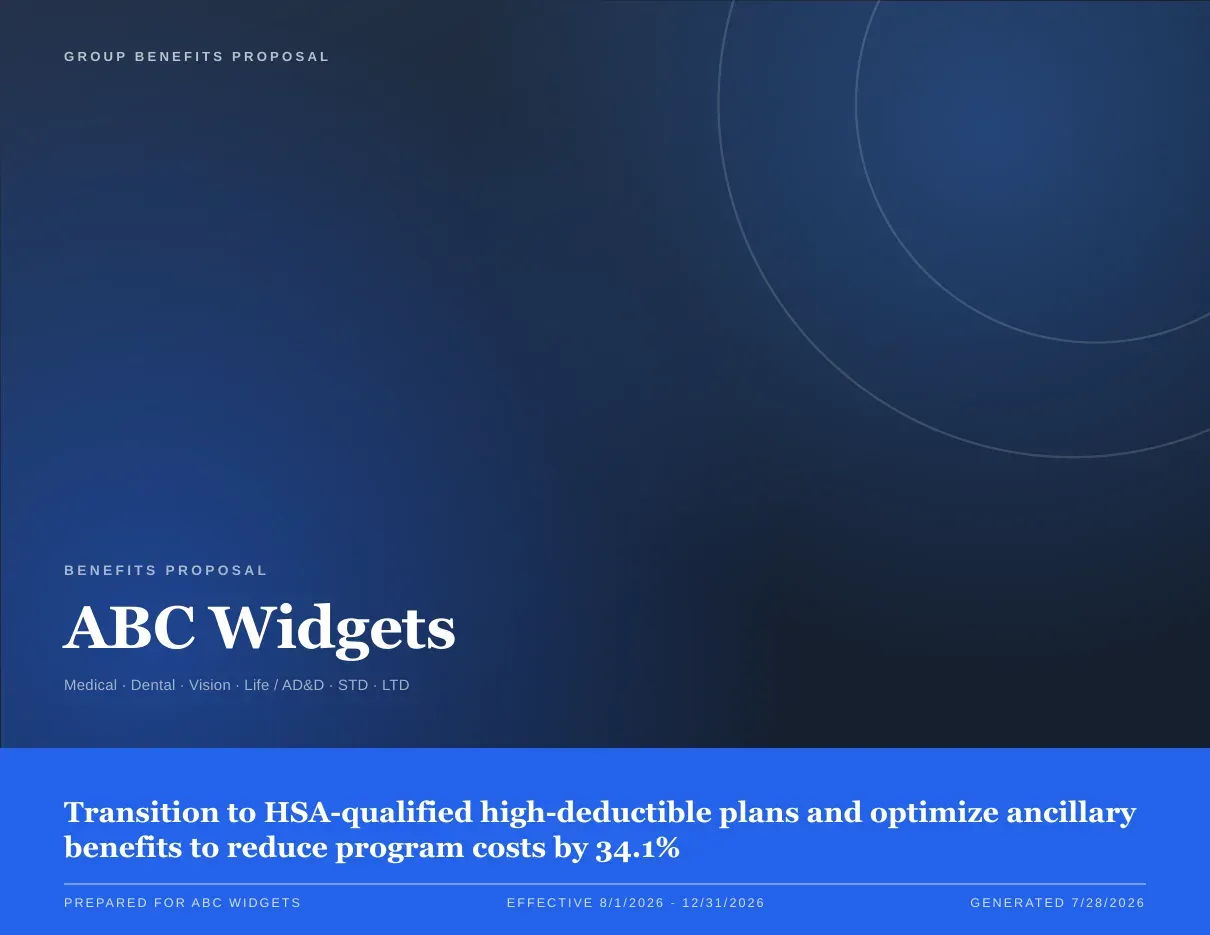
Page 1 of 7Every line of coverage — current vs proposed vs alternate — with the employer and employee split.
Download an actual six-page fictional proposal export and check its calculations. The sample explains its manual-entry method and source-verification limits.
Compose it in four steps, watch it render live
Content
A chapter outline with page counts. Drop the pages you don’t need, reorder the rest.
Recommendation
Name the proposed path and its alternates — the book highlights them throughout.
Design
Your logo, colors and cover treatment. Save it as a version you can reuse next renewal.
Export
PDF for the meeting, a client screen for the room, HTML for the follow-up email.
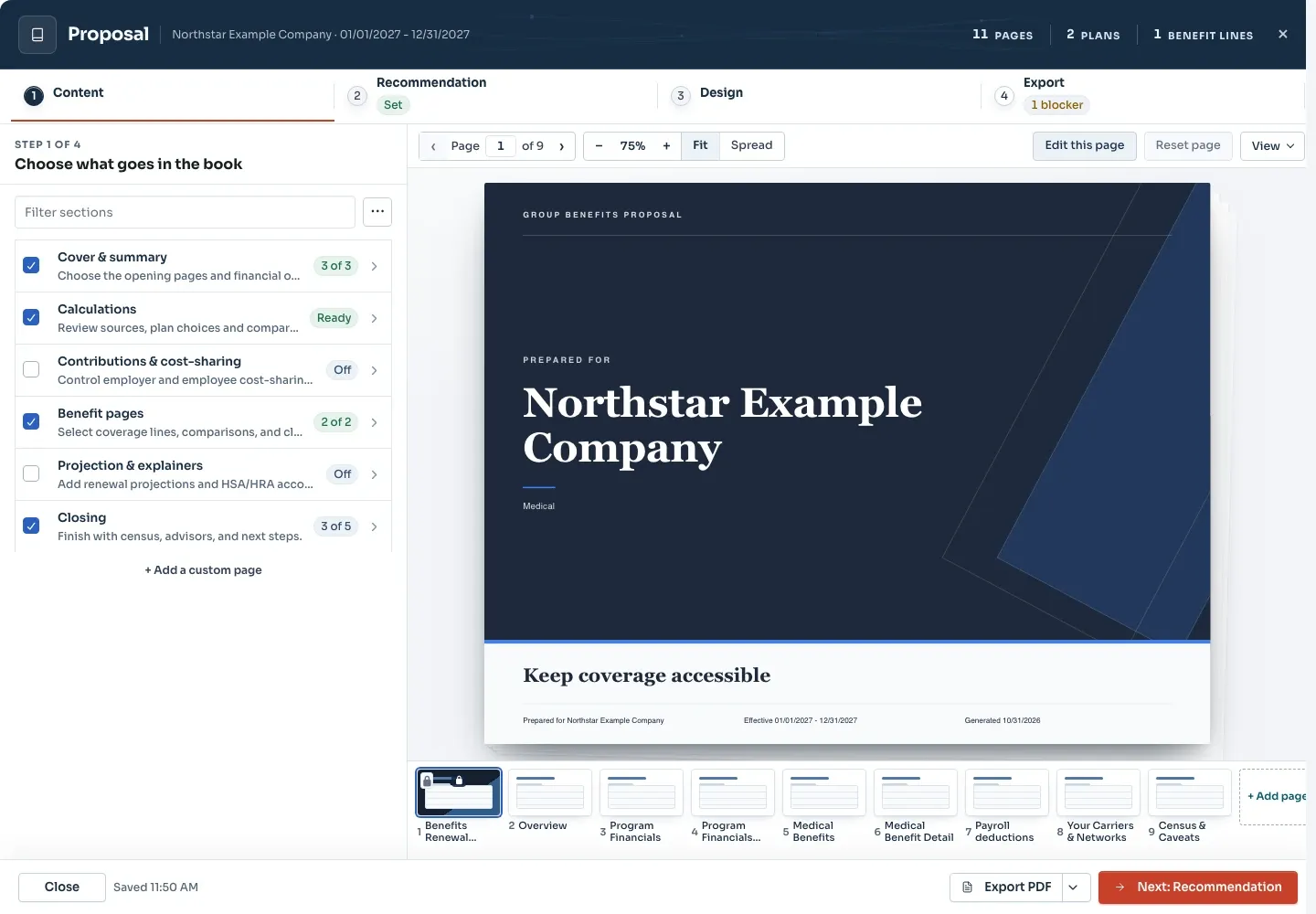
Live preview · updates as you edit
Inputs and outputs
What goes in, what comes out.
You bring
- The approved case: plans, rates, contribution settings and enrollment.
- The recommendation: the proposed path and its alternates, which the book highlights throughout.
- Your logo, colors and cover treatment, saved as a design version you can reuse next renewal.
You get back
- A branded benefit proposal PDF: cover, program financials, benefit comparison, multi-year projection, strategy, paycheck math and a signature page.
- An Excel workbook with plan comparison sheets per benefit type, plus Contributions, Projection and Deductions sheets.
- A client screen for presenting the same book in the room.
Every accepted file type and export format is listed on the integrations, exports and API page, and the one-page summary of what Planlined is and is not lives on Planlined product facts.
When to use it
Where it fits in a renewal.
- The renewal committee meetingHand the committee a book whose financials reconcile to the quoted premiums and whose strategy is written out in plain language.
- The finance follow-upSend the Excel workbook when someone wants to check the contribution and projection math behind the pages.
- Next year's renewalStart from the saved design version so the next book opens already branded, then drop or reorder chapters for the new case.
What it does not do
- It does not produce PowerPoint or Word files. The book exports as PDF and Excel, and meetings run from Present Proposal.
- It is not a quoting engine. The premiums in the book are the ones in the carrier documents you uploaded.
Proposal book questions
What is a benefit proposal in Planlined?
A branded employer-facing recommendation that brings plan options, program financials, contribution scenarios and next steps together. The Proposal Book feature composes the PDF and Excel deliverables from the reviewed case.
What formats does the proposal book export to?
PDF and an Excel workbook. The PDF is the leave-behind; the workbook carries the plan comparison, contribution, projection and deduction sheets.
Can I remove proposal book pages I do not need?
Yes. The builder shows a chapter outline with page counts. Drop the pages you do not need, reorder the rest, and watch the live preview update as you edit.
Does the proposal book update when the case changes?
Yes. Financials reconcile to the premiums you entered, comparisons pull from the plans in the case, and changing a contribution changes the paycheck page with it.
Your next renewal meeting, already designed.
Build the case once. Planlined writes the book.