Feature
Side-by-Side Benefit Quote Comparison
Planlined automates side-by-side benefit quote comparisons across multiple carriers and plan types, with normalized, client-ready output.
Read the video walkthrough
This silent clip shows a fictional demonstration, not a customer result.
Review & Assign Plans displays two fictional medical options from the same source quote. Both plans initially have an Unassigned role.
The reviewer opens the first plan’s role menu and selects Proposed. The second plan is then marked Alternate. The designation count changes from one to two plans.
Plan roles are assigned manually in this demonstration. Confirm each plan’s benefits and rates against the original quote before carrying the selected options into the comparison and proposal.
See the completed result
See the costs in a finished medical proposal.
Follow two medical plans from reviewed rates to employer contributions, paycheck costs and a six-page proposal PDF.
- Current → renewal per month
- $8,200 → $9,020
- Employer contribution
- 75%
- Employee-only per paycheck · 26 deductions
- $63.46
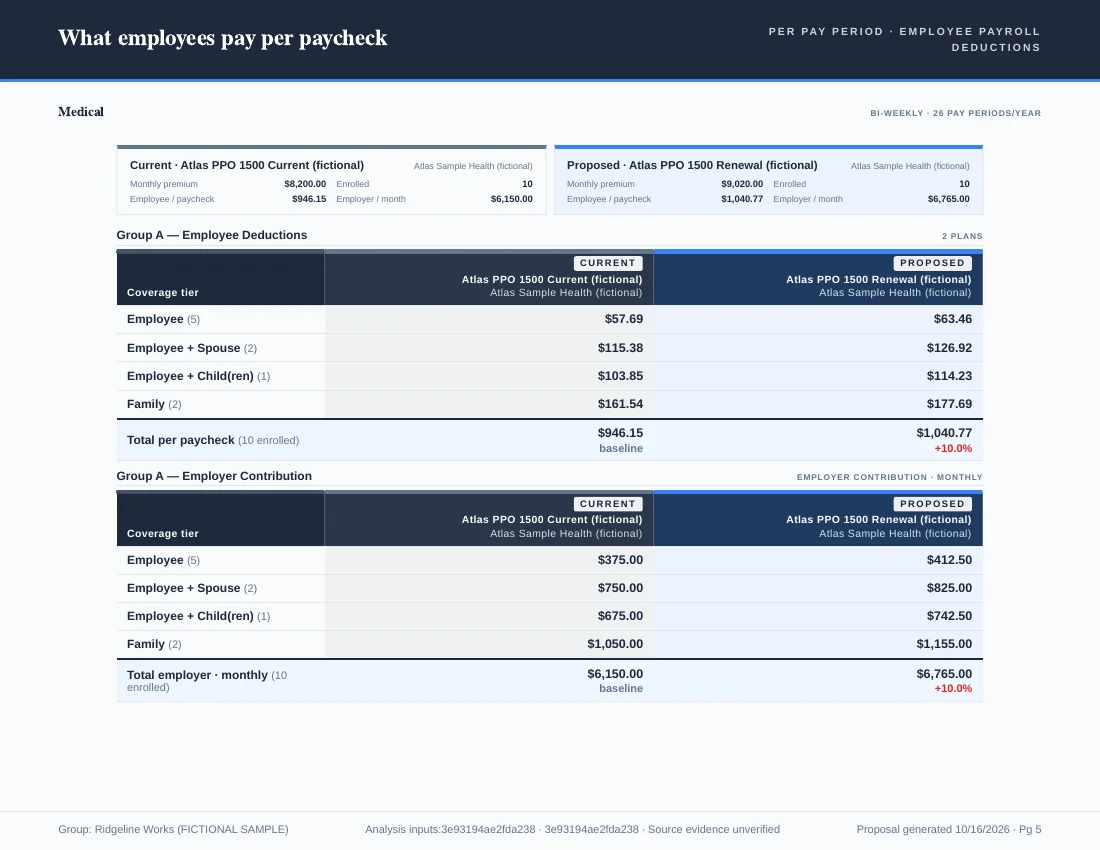
Fictional medical example. Plan roles and contributions were set manually. The published PDF contains six proposal pages; the worked example includes the source inputs and verification method.
What you get
Why Side-by-Side Benefit Quote Comparison?
- Unlimited CarriersCompare any number of carriers and plans in a single view without limitations.
- Normalized DataStandardized fields ensure apples-to-apples comparisons across different carrier formats.
- All Benefit TypesMedical, dental, vision, life, disability, and more—all in one comparison.
- Client-Facing OutputClean, professional comparisons ready for client presentations.
- Renewal vs. AlternativeEasily compare current plans against new options for renewal season.
- Highlight DifferencesAutomatically surface key differences between plans to guide decisions.
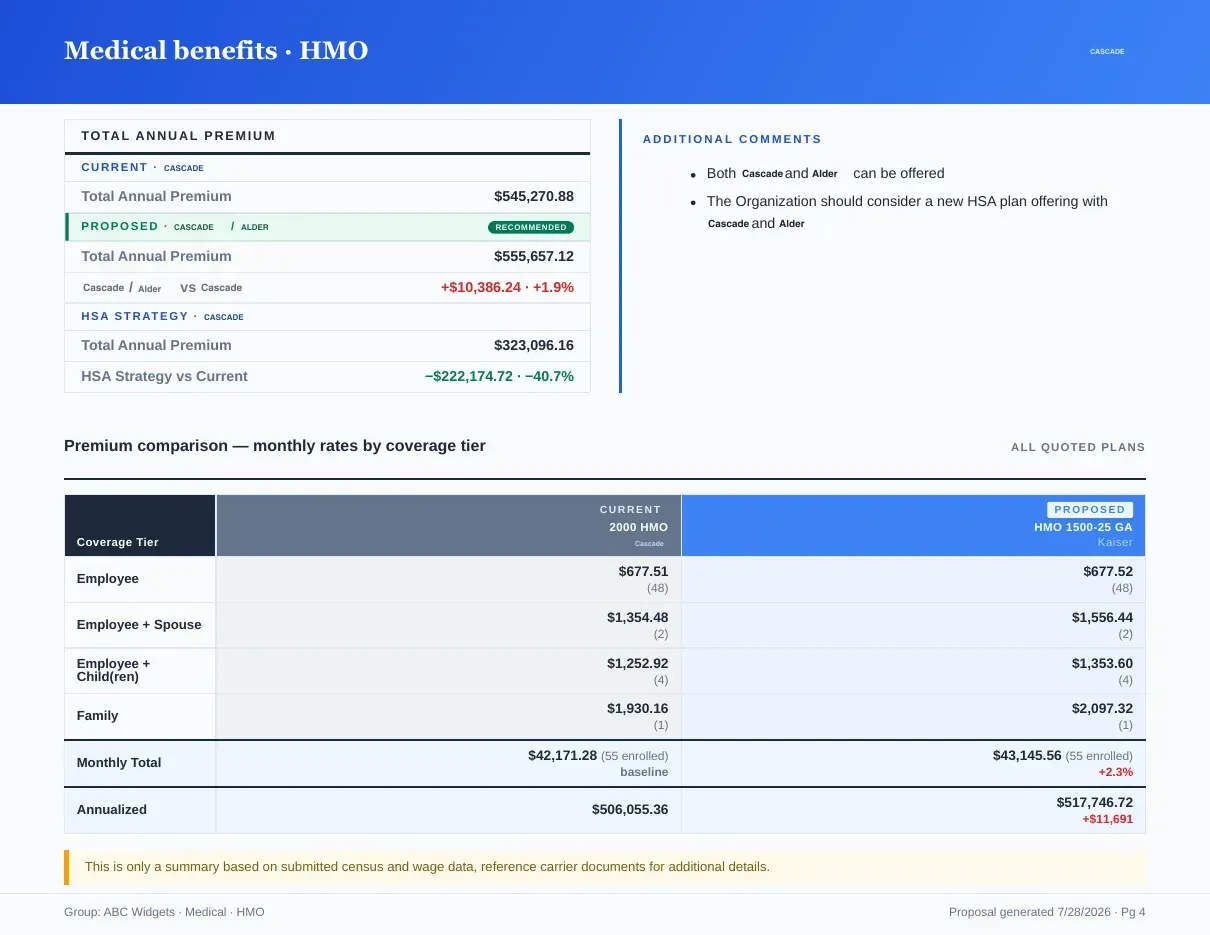
Every plan, every tier, on one page.
Monthly rates by coverage tier and annualized totals, with your commentary running alongside — the comparison the committee actually reads. If the inputs are Summary of Benefits and Coverage PDFs, the SBC comparison tool reads them into the same table. The benefit comparison software page covers the contribution modeling that runs on top of it, and benefit comparison software vs Excel shows what the spreadsheet version costs every renewal.
Benefit Types Supported
Inputs and outputs
What goes in, what comes out.
You bring
- Carrier quotes, SBCs and rate sheets for every plan you want in the view.
- A role for each plan: current, proposed or alternate.
You get back
- Current, proposed and alternate plans side by side, with one Excel sheet per benefit type.
- Benefit comparison pages in the proposal book PDF, with monthly rates by tier, annualized totals and your comments.
- Plan comparison data as JSON.
Every accepted file type and export format is listed on the integrations, exports and API page, and the one-page summary of what Planlined is and is not lives on Planlined product facts.
When to use it
Where it fits in a renewal.
- Renewal against the marketLine up the renewal beside the alternates so the committee reads plan design and price in the same table.
- Ancillary lines in the same caseCompare dental, vision, life and disability proposals next to the medical plans instead of in separate files.
- Beyond the premiumShow deductibles, out-of-pocket maximums and copays in-network and out for every plan, not just the monthly rate.
What it does not do
- It compares the plans you bring. It does not source quotes from carriers.
- It does not export PowerPoint or Word. The comparison goes out in the proposal book PDF, the Excel workbook, or live in the meeting.
Side-by-side quote comparison questions
How many carriers can one side-by-side comparison include?
Any number. Planlined compares carriers and plans in a single view without a limit on how many you add.
Which benefit types can I compare side by side?
Medical, dental, vision, life, and short- and long-term disability, all in one case.
Can the plan comparison go to the client as a file?
Yes. It exports inside the proposal book PDF and as Excel sheets, one per benefit type.
Run your next renewal through Planlined.
Upload the carrier packet. Walk out with the comparison, the proposal book and the employee guide.