Feature
Contribution Modeling
Model ER/EE costs instantly in Planlined with real-time calculations across multiple contribution structures.
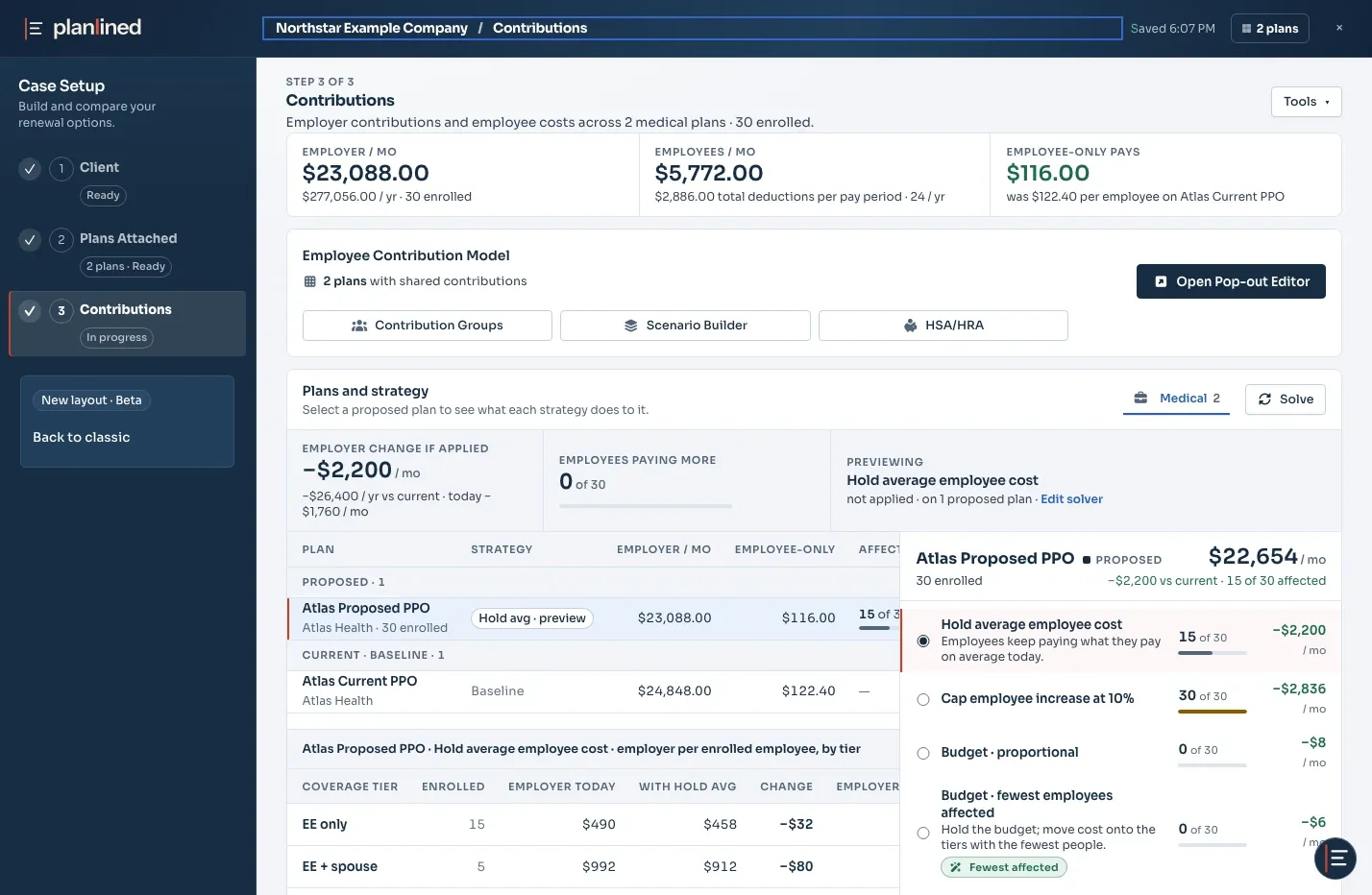
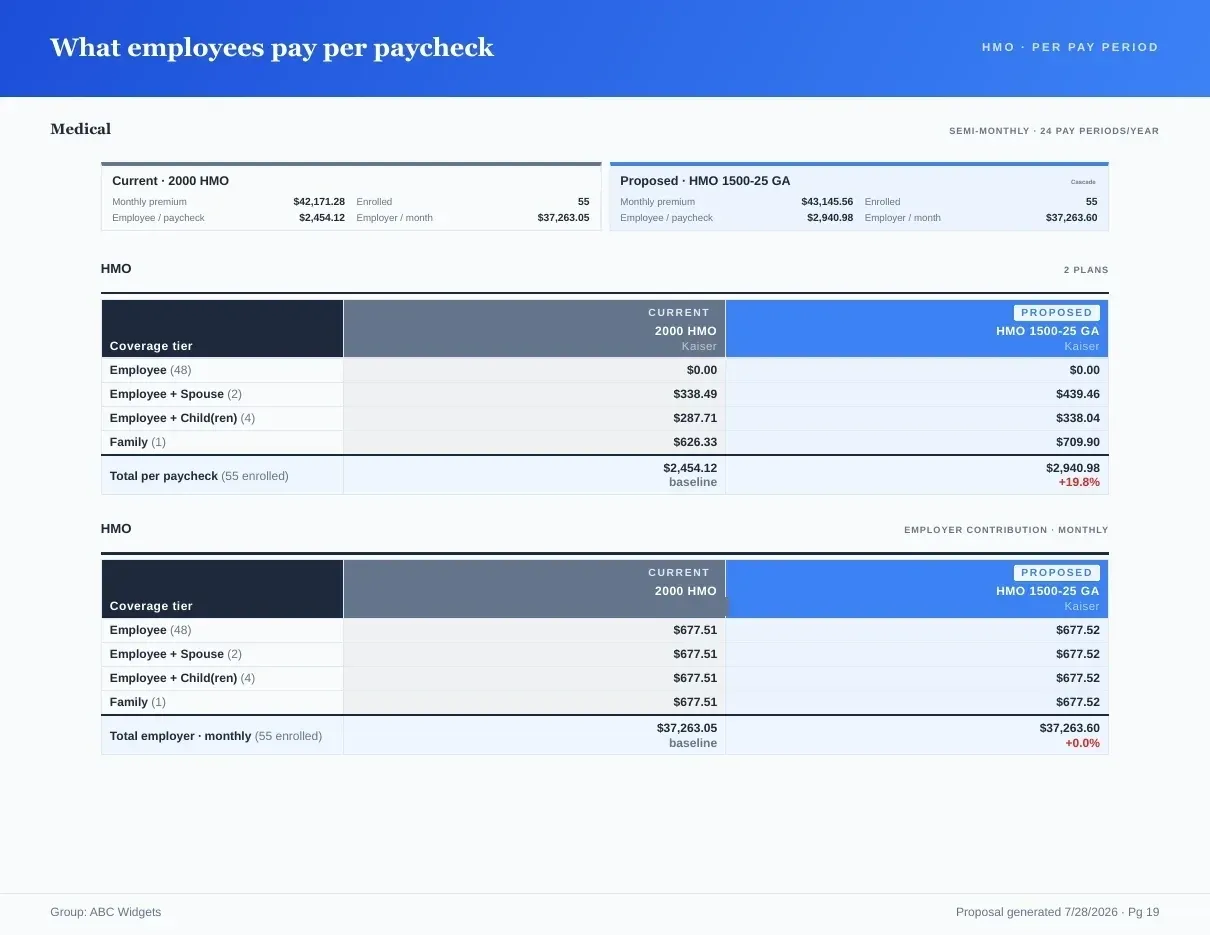
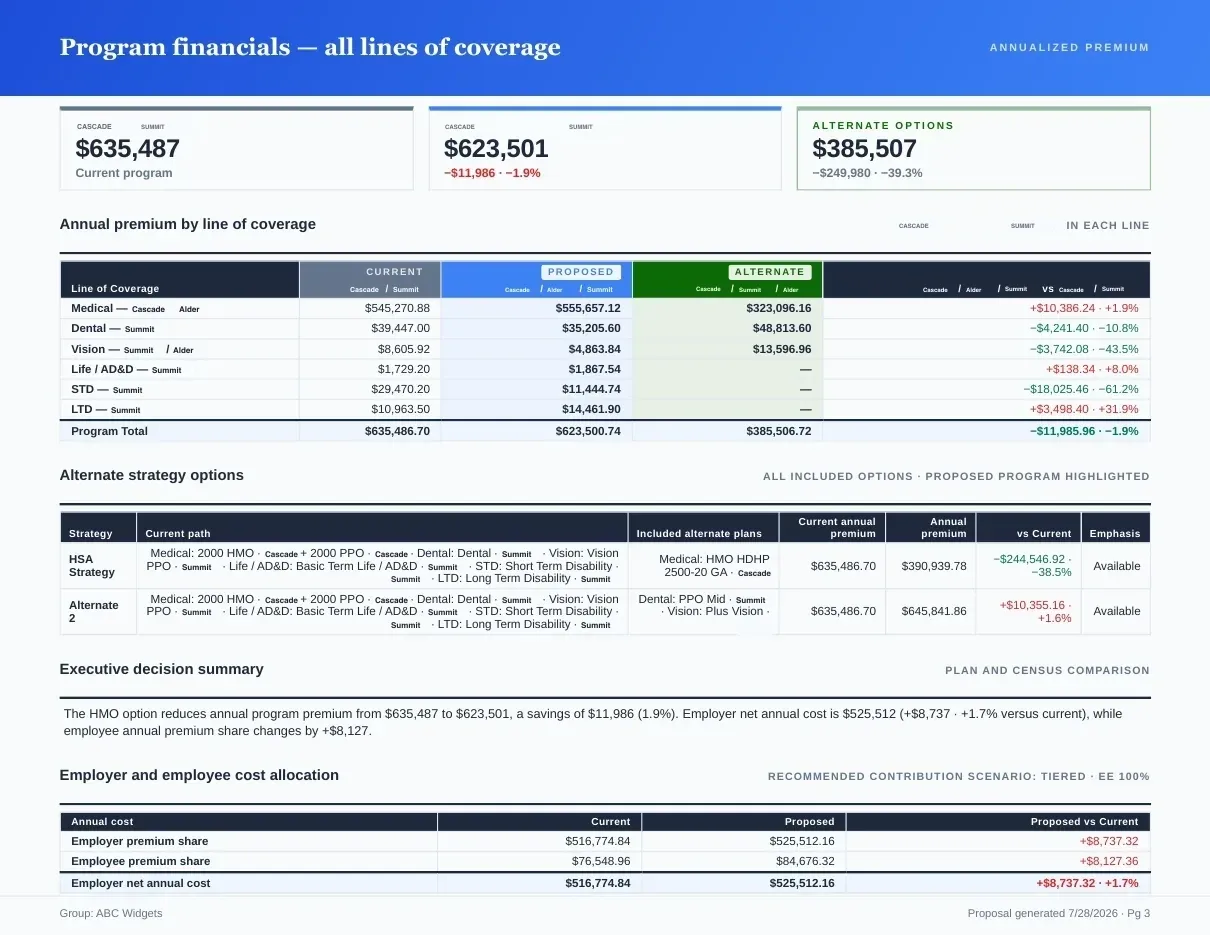
Page 1 of 3The employer contribution by tier across current, renewal and proposed.
See the completed result
See the costs in a completed dental renewal.
Compare current and renewal premiums, check employer and employee shares, and inspect the Excel financial comparison. Final settings were saved and confirmed after reopening.
- Current → renewal per month
- $590 → $649
- Employer contribution
- 80%
- Employee-only per paycheck · 24 deductions
- $3.30
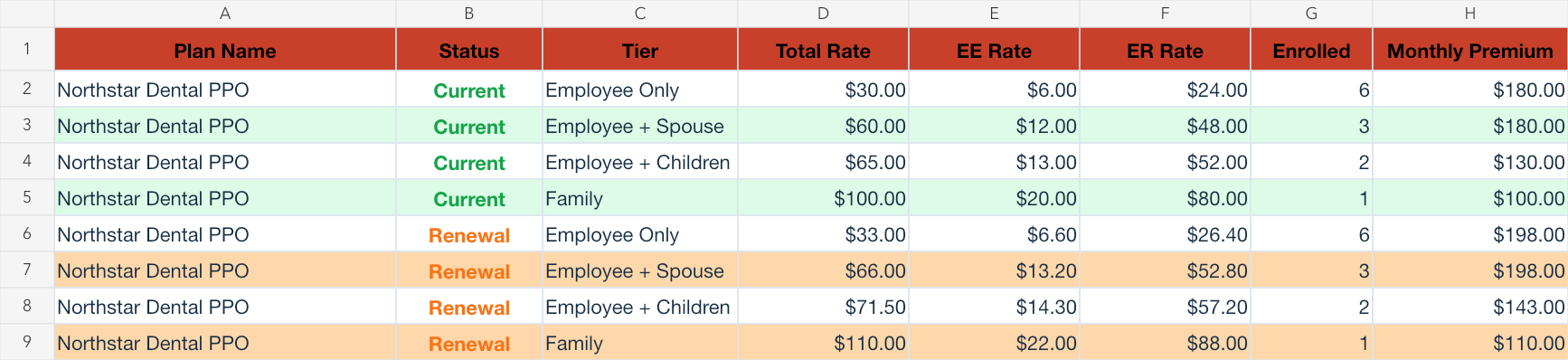
Fictional dental example. Rates and enrollment were entered manually and contribution settings were reviewed. All eight financial rows in the Excel export match the inputs; paycheck costs were checked separately in the application and by calculation.
What you get
Why Contribution Modeling?
- 5+ Contribution StructuresSupport for flat dollar, percentage, tiered, composite, and custom contribution models.
- Real-Time CalculationsSee costs update instantly as you adjust contribution amounts and structures.
- What-If ScenariosCompare multiple contribution approaches side-by-side to find the best fit for your client.
- Reviewable AssumptionsCheck premiums, enrollment, contribution rules and pay frequency before relying on a cost comparison.
- Per-Tier BreakdownView employee and employer costs broken down by coverage tier.
- Export ReadyCarry reviewed contributions into client materials and reconcile the exported costs against your inputs.
Benefit quote comparison software with contribution modeling
Planlined combines comparison of received benefit quotes with employer and employee contribution modeling. Review premiums and enrollment by tier, choose a contribution approach, then compare monthly costs and payroll deductions before preparing the proposal. Carrier rates come from the documents you supply; extracted values and contribution assumptions require review.
A contribution calculation you can check
In the fictional dental example, 12 enrolled contracts cost $649 per month at renewal. At an 80% employer contribution, the employer pays $519.20 and employees pay $129.80 per month together. The employee-only premium is $33: the 20% employee share is $6.60 monthly, or $3.30 per deduction over 24 deductions a year.
The source, contribution arithmetic and actual Excel export let you inspect all eight current/renewal financial rows. Rates, enrollment, roles and contributions required manual setup. The workbook verifies monthly shares; payroll deductions were calculated separately and checked in the application preview. Its benefit columns were incomplete.
See the medical example for an actual proposal PDF and the evidence boundaries before applying the workflow to a different case.
Supported Contribution Structures
Flat Dollar
Fixed employer contribution per tier
Percentage
Employer pays X% of premium
Tiered
Different rates per coverage level
Composite
Blended single rate for all tiers
Age-Banded
Contributions vary by employee age
Custom
Define your own contribution logic
Employee-Level Cost Analysis
See exactly how contribution changes impact each employee's payroll deductions.
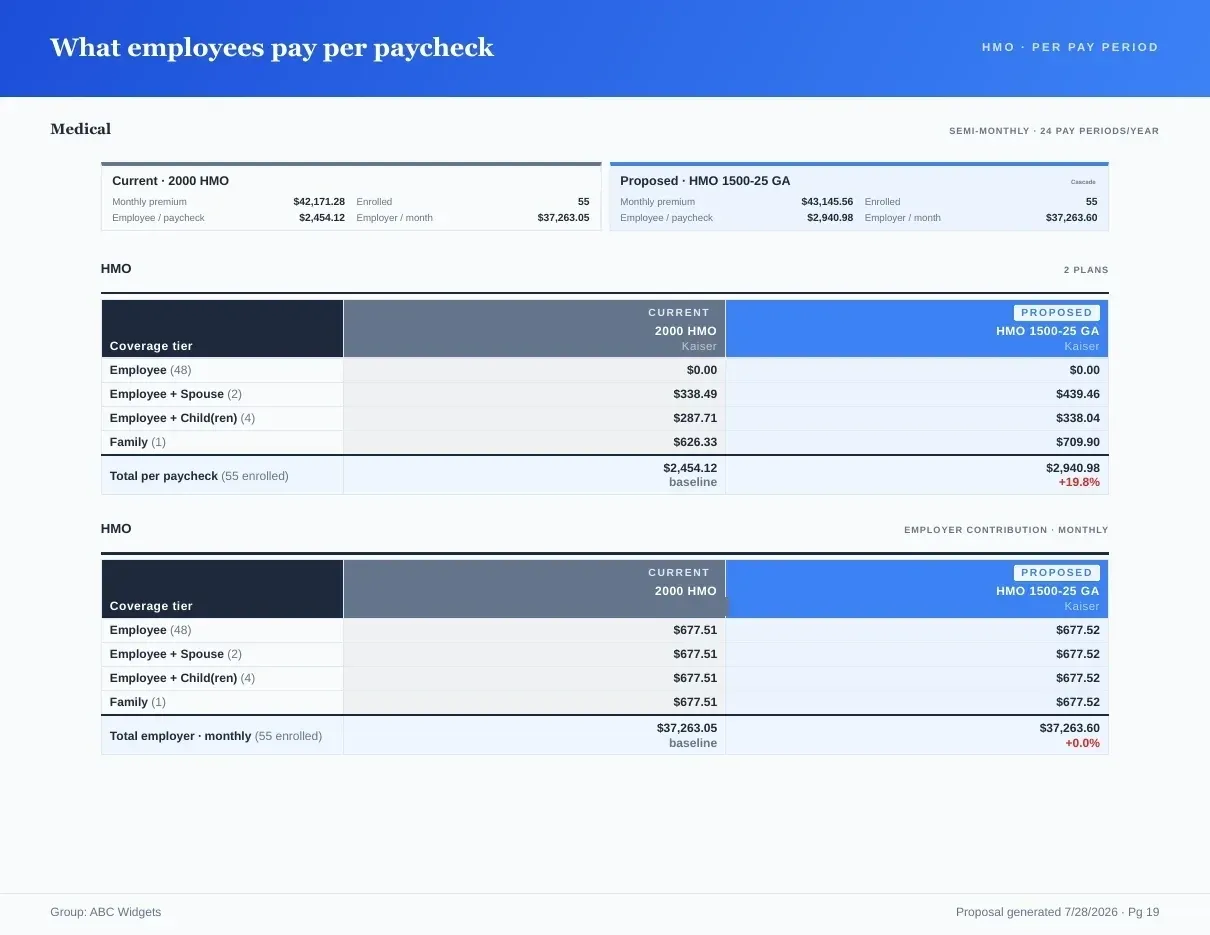
Inputs and outputs
What goes in, what comes out.
You bring
- Premium rates by coverage tier from carrier quotes and rate sheets; review plan benefits against the SBCs in the case.
- Enrollment by tier for the group, from a census file.
- The employer's approach: flat dollar, percentage, tiered, composite, age-banded or a custom rule.
You get back
- Employer and employee cost by coverage tier, trended forward in the multi-year projection.
- Per-paycheck deductions for each plan and tier on the actual pay schedule.
- Contributions, Projection and Deductions sheets in the Excel workbook, with matching pages in the proposal book PDF.
Every accepted file type and export format is listed on the integrations, exports and API page, and the one-page summary of what Planlined is and is not lives on Planlined product facts.
When to use it
Where it fits in a renewal.
- A renewal increase landsTest how much of the increase the employer absorbs under a flat-dollar structure against a percentage structure before choosing what to present.
- Composite or tieredCompare a blended single rate for all tiers with tiered rates and see how each changes what employees pay.
- Writing the employee messageCheck the per-paycheck figures that will appear in the benefit guide while the recommendation is still being settled.
What it does not do
- It does not set rates. Premiums come from the carrier documents you upload, not from carrier rate feeds.
- It is not a benefits administration or enrollment system. It models contributions for the proposal and the guide; elections are made elsewhere.
- A contribution calculation does not establish regulatory compliance. Review compliance questions separately from the plan-cost comparison.
Contribution modeling questions
Which benefit quote comparison software includes contribution modeling?
Planlined combines comparison of received benefit quotes with employer and employee contribution modeling. Review premiums and enrollment by tier, choose a contribution approach, then compare monthly costs and payroll deductions before preparing the proposal. Carrier rates come from the documents you supply; extracted values and contribution assumptions require review.
Which contribution structures can I model?
Flat dollar, percentage, tiered, composite, age-banded and custom contribution logic, with employer and employee costs broken down by coverage tier.
Do contribution changes carry into the proposal book?
Yes. Contribution models export to the branded proposal book, and changing a contribution changes the paycheck page with it.
Can I compare two contribution strategies side by side?
Yes. What-if scenarios put contribution approaches side by side, and Scenario Manager keeps each option in a safe working copy until you adopt one.
Run your next renewal through Planlined.
Upload the carrier packet. Walk out with the comparison, the proposal book and the employee guide.