Alternatives to Excel for Benefit Proposals: A Broker Guide
The best Excel alternative depends on where the work starts. A template is enough for occasional proposals; a database helps teams share structured data; a generic proposal builder improves presentation; and document-first benefits software such as Planlined handles carrier-file intake, source review, contribution modeling, and client output together.
| Alternative | Best fit | Main tradeoff |
|---|---|---|
| Controlled Excel or Sheets template | Occasional proposals and unusual calculations | Manual source entry and formula ownership remain |
| Airtable or database workspace | Shared plan libraries and team workflow | Benefits logic and client output must be built |
| Generic proposal software | Design, approvals, and signatures | Does not normally interpret SBCs or rate tiers |
| Carrier-rate quoting platform | Quoting from a connected rates database | May not match emailed PDF and spreadsheet workflows |
| Document-first benefits software | Recurring carrier PDFs, comparisons, and proposals | Requires source review and a product workflow |
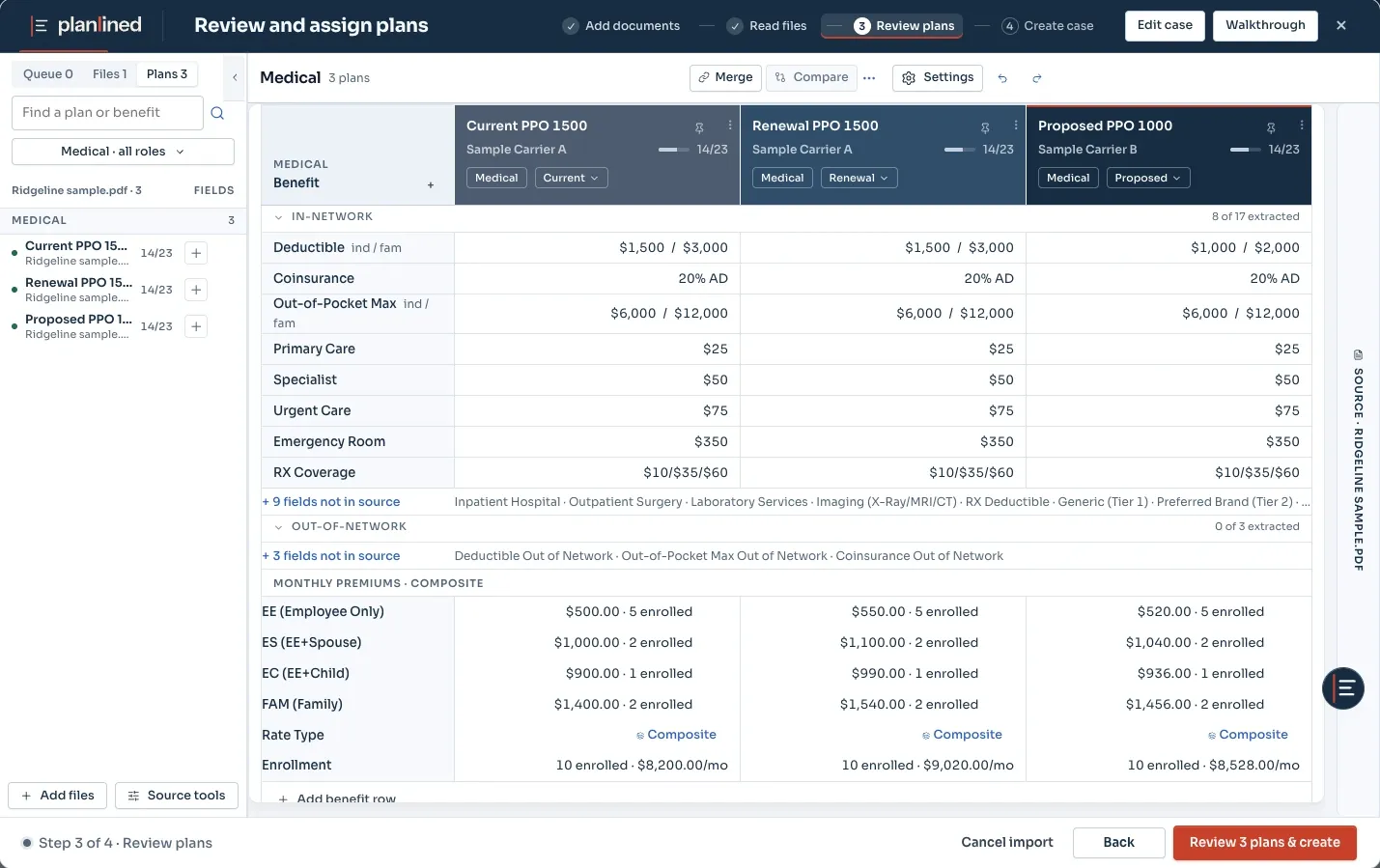
What changes when you move a real comparison out of Excel?
Planlined is an alternative to maintaining a separate benefit comparison spreadsheet when your work starts with received carrier files. You still verify rates, benefits, enrollment and contribution assumptions. The product organizes that reviewed case and produces the comparison and client output; it does not make source checking unnecessary.
Inspect the fictional dental workbook and actual product export: the checked monthly premium moves from $590 to $649 for the same enrollment, and the exported financial rows preserve the reviewed rates and employer/employee shares. Import did not extract the rates or enrollment, so those were entered manually. This demonstrates the completed calculation and export workflow, not automatic extraction success.
The medical source packet and actual proposal PDF show the presentation output. Use the same known inputs in your spreadsheet and trial case, then compare missing fields, corrections, totals and final files before measuring time saved.
Does benefits administration software replace a comparison spreadsheet?
Benefits administration and proposal preparation answer different questions. Enrollment setup, eligibility changes and carrier transmission belong in the administration workflow. A comparison spreadsheet or proposal tool organizes received quotes and the employer’s choices before that handoff. Confirm which job you need done before comparing products.
Use HealthCare.gov’s SBC guidance to identify the standardized plan summary. Keep the current SBC and rate confirmation with either workflow. Moving a field into software does not establish that its source was read correctly.
Compare review controls, not an assumed error rate
For a spreadsheet, identify who owns the formulas, which input cells can be changed and how the team recognizes the approved version. For a proposal tool, check how missing values, source corrections and contribution assumptions appear before export. Run the same reviewed case through both and reconcile the resulting totals.
The figures in the dental example above come from its linked source workbook and actual export. They describe that fictional case only. Subscription prices below come from the same offer data as pricing; there is no universal time or error-reduction percentage in this comparison.
Modern Benefit Comparison Software: The Automation Alternative
Purpose-built software addresses Excel's limitations with automation and intelligent features:
Automated Data Extraction
Planlined brings carrier PDFs and Excel files into one reviewable case, where plan details can be checked alongside their source material.
- Upload carrier rate sheets → Review extracted rates and enter missing values
- Upload SBC documents → Review plan data with the source files
- Upload census files → Employee data imported
Built-In Calculation Logic
Pre-built calculation engines handle contribution modeling, cost projections, and census aggregations automatically.
- Review the selected contribution rule and its inputs
- Instant recalculation when you change any number
- Reconcile totals and missing values against the source
Professional Templates
Branded proposal templates provide a starting point for client delivery:
- Add your logo and colors once
- Review the final layout and values before delivery
- Use the documented PDF and Excel outputs; confirm other delivery formats separately
Rapid Revisions
Develop a revised recommendation without rebuilding disconnected spreadsheets:
- Compare a proposed contribution scenario with the current baseline
- Recalculate the scenario and check the resulting employee costs
- Keep the baseline unchanged until you adopt a reviewed scenario
Time with Automation Software
The value of an automated workflow is a clear, reviewable case and less repeated formatting work—not a promised fixed completion time.
Head-to-Head Comparison
| Feature | Excel | Comparison Software |
|---|---|---|
| Data Entry | Manual transcription from source files | Automated extraction followed by source review |
| Calculations | Manual formulas | Built-in engines |
| Error Risk | Depends on entry, formulas, and review controls | Uncertain extracted values remain reviewable |
| Formatting | Manual layout and print-area maintenance | Generated proposal templates |
| Revisions | Update cells, formulas, and presentation separately | Update the reviewed case and regenerate output |
| Learning Curve | Minimal (familiar) | Product-specific intake and review workflow |
| Cost | Usually part of an existing office suite | Planlined: $75/month or $744/year |
| Total Time | Manual entry, formula work, and formatting | Varies by case and source review |
Professional is $75 per month or $744 per year ($62 per month billed annually), with 250 AI credits per month. Paid cases and exports are unlimited; AI processing has a separate allowance. Confirm workspace setup before purchasing for a team. Start a 7-day free trial with full features. A card is required to start, and Professional bills $75 a month after the trial unless you cancel first.
When Does Software Pay for Itself?
Measure your own workflow instead of borrowing a universal time-savings percentage. For one normal case, record the time spent transcribing source files, checking formulas, formatting the client output, and making revisions. Compare that with the same case in the software, including source review. Multiply the difference by monthly proposal volume and loaded hourly cost, then subtract the subscription price.
The Planlined ROI calculator keeps those assumptions visible so you can decide from your own volume rather than a marketing benchmark.
When Excel Still Makes Sense
To be fair, there are scenarios where Excel remains the better choice:
- Proposal work is occasional and your existing template is maintained
- You have extremely custom formatting requirements
- You need to analyze data in ways standard software doesn't support
- Budget constraints make any monthly cost prohibitive
Making the Transition
If you decide to try automation software — dedicated benefit comparison software for brokers, or the SBC comparison tool when your inputs are SBC PDFs — here's how to make the switch smooth:
- Start with one proposal: Use a documented example or another approved test case.
- Compare side-by-side: Create the same proposal in Excel and the software. See the time difference yourself.
- Keep Excel as backup: Keep the reviewed template available until the team has verified the new output and correction workflow.
- Train your team: If you have multiple people creating proposals, schedule a training session together.
Compare Both Approaches
Download our free Excel template OR try Planlined's automated software. See which approach works better for your workflow.
Conclusion: The Right Tool for the Right Job
Excel is a powerful, flexible tool that will always have a place in benefit analysis. But for repetitive proposal creation, automation software offers clear advantages:
- A shared, reviewable workflow for routine proposals
- Source-linked review instead of hidden transcription
- Professional, consistent output
- A measurable workflow change you can test on a real case
Use Excel when flexibility matters more than repeatability. Use document-first benefits software when the same carrier-file, review, modeling, and client-delivery work repeats often enough that one connected case is easier to maintain than several spreadsheets.
Frequently asked questions
What is the best alternative to Excel for benefit proposals?
For recurring carrier-PDF workflows, use document-first benefits software that keeps extraction, source review, contribution modeling, and client output in one case. For occasional proposals, a controlled spreadsheet template may still be the better fit.
Can a generic proposal tool replace a benefits comparison spreadsheet?
A generic proposal tool can improve layout and signatures, but it usually does not normalize SBC fields, carrier rate tiers, or employer and employee contribution calculations. It works best after the benefits analysis is complete.
Can Planlined export data back to Excel?
Planlined supports workbook output for teams that need an editable spreadsheet after the reviewed case and proposal have been prepared.