Fictional worked example
A completed dental renewal, with costs you can check.
Compare two fictional dental options, see the employer and employee cost split, and download the completed Excel financial comparison. The final settings were saved to cloud and checked again after reopening the case.
What this example demonstrates
Verified October 22, 2026 through the production application UI. Using manually entered, reviewed rates and enrollment, this example demonstrates a completed financial comparison, contribution modeling, final save/reopen and an actual Excel export.
Swipe or scroll sideways to read the full results table.
| Workflow | Evidence status | Observed result |
|---|---|---|
| Current and renewal comparison | Demonstrated | Two fictional dental plans and 12 enrolled contracts produce a checked comparison: $590 current and $649 renewal per month, a 10% increase with enrollment held fixed. |
| Employer and employee costs | Demonstrated | At 80% employer contribution, the renewal costs $519.20 per month for the employer and $129.80 for employees. Employee-only deductions are $3.30 across 24 deductions per year. |
| Final cloud save and reopen | Demonstrated | A fresh production browser tab reopened the saved case with all eight rates, four enrollment counts, policy period and final contribution totals intact. |
| Excel financial export | Demonstrated | All eight exported tier rows agree with the reviewed inputs: monthly rates, employee/employer shares, enrollment and premiums. Download the actual product workbook below. |
| Reviewed case setup | Manual setup | Rates and enrollment were entered manually from the source, along with Current/Renewal roles, the policy period and contribution assumptions. The review notes describe the import and benefit-field limits. |
Download the comparison and inputs
Direct downloads, no signup. The check record identifies the files and their SHA-256 hashes.
- Download the actual product export (Excel)
The actual product workbook, including the eight checked financial rows in Rates & Enrollment. See the review notes for the benefit-sheet scope.
- Download the fictional dental source (Excel)
Invented inputs and expected totals created before the single import attempt.
- Download the check record and file hashes (JSON)
Expected and observed values, manual steps, final reopen result, workbook cell checks and limits.
Check the rates, enrollment and employee cost
The reviewed comparison covers 12 contracts: six employee-only, three spouse, two child and one family. Both plans use 80% employer contributions and 24 deductions annually.
| Coverage tier | Enrolled | Current | Renewal | Employer / month | Employee / month | Employee / deduction |
|---|---|---|---|---|---|---|
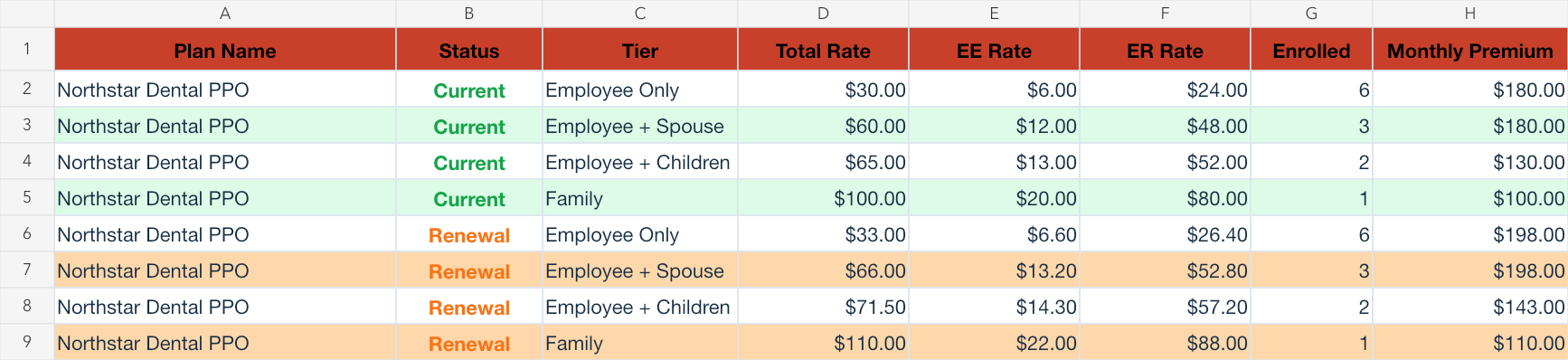
| Employee only | 6 | $30.00 | $33.00 | $26.40 | $6.60 | $3.30 |
| Employee + spouse | 3 | $60.00 | $66.00 | $52.80 | $13.20 | $6.60 |
| Employee + child(ren) | 2 | $65.00 | $71.50 | $57.20 | $14.30 | $7.15 |
| Family | 1 | $100.00 | $110.00 | $88.00 | $22.00 | $11.00 |
Current premium is (6 × $30) + (3 × $60) + (2 × $65) + (1 × $100) = $590 per month, or $7,080 annually. Renewal is $649 per month, or $7,788 annually: a $59 monthly increase, equal to 10%, with enrollment held fixed.
At renewal, $649 × 80% = $519.20 employer cost per month; employees pay $129.80 per month together. The employee-only share is $33 × 20% = $6.60 per month; $6.60 × 12 ÷ 24 = $3.30 per deduction. Group deductions total $64.90 per pay period. These deduction amounts were independently calculated and checked in the application preview; the Excel file contains monthly shares.
In the exported Rates & Enrollment sheet, rows 2–5 are Current and rows 6–9 are Renewal. Column D is monthly premium per contract, E/F are employee/employer monthly shares, G is enrollment and H is the tier’s total monthly premium. All eight rows agree with the manually reviewed inputs.
See the medical proposal example too
The medical PDF example shows two plans and eight extracted rates carried through a reviewed comparison and actual proposal PDF. Together, the examples let you inspect both proposal and spreadsheet outputs. See the capability and evidence table for the broader boundaries.
How we verified the result
- Create the invented source workbook before the run. Upload it once through the production application’s normal Import files flow using Best available reading, without forced parser hints or injected case data. The UI reported two provider calls.
- Review both extracted plans against the workbook. Preserve the missing rates, enrollment, family deductible, name suffixes and unconfirmed carrier as findings. Assign Current/Renewal roles and explicitly accept the incomplete source decision; this does not verify its fields.
- Enter the missing rates and enrollment in Case Setup. Set 80% employer contributions for every tier, confirm 24 deductions per year and manually correct the default policy period to January 1–December 31, 2027. Save the final settings to cloud.
- Open a fresh production application tab and reopen the saved fictional case. Check every tier rate and enrollment count, the policy period, employer/employee totals and 24-deduction model. The dashboard’s annual maximum and deductible still require source verification.
- From the reopened case, use Export Comparison Report → Excel. Read all eight Rates & Enrollment rows and reconcile them independently with the source arithmetic. Preserve the downloaded workbook bytes unchanged, including its blank Dental Plans benefit columns.
What to review in your own case
- One invented dental workbook is not an accuracy benchmark for carriers, scans, other spreadsheets or benefit types. No real carrier or customer data was used.
- All eight rates and enrollment were missing after import and were entered manually. Roles, contributions and the policy period required manual setup; both plan names lost their Current/Renewal suffixes. The fictional carrier stayed unconfirmed.
- Review showed two dental plans with $1,500 annual maximum, $50 deductible and 100%/80%/50% preventive/basic/major plan-paid percentages. The review displayed only $50 of the source’s $50 individual / $150 family deductible. The reopened dashboard showed Source verification required for the deductible and annual maximum. Those benefits are not verified product output.
- The Excel export contains monthly financial values, not a payroll-deduction schedule. Its Dental Plans sheet has blank benefit columns and places current/renewal in the Type column while Status is blank. No completed benefit guide, proposal-book PDF, recommendation or client acceptance is demonstrated.
- The check used the production UI; the application build revision and an independent download/hash check of the cloud-attached source were not established. Public source/output hashes identify these downloadable files, not verified source-location links.